Microsoft backs down: Older PCs will be able to run Windows 11, unofficially – PC World New Zealand
Older PCs will be able to install Windows 11 in some way, but conflicting reports have only muddied the water further.
Mark Hachman (PC World (US online)) on 28 August, 2021 06:06
Microsoft said Friday that the company is relenting somewhat on its minimum requirements for Windows 11, allowing enthusiasts that understand the risks to download and upgrade Windows 11 on older, unsupported hardware. Exact details remain murky, however, due to conflicting reports and the lack of an official Microsoft statement.
Users who choose to download a standalone Windows 11 ISO file (as explained in how to upgrade to the Windows 11 beta) will be permitted to run Windows 11, even if the PC doesn’t technically qualify for the OS upgrade. Reports by ZDNet, The Verge, Windows Central, and Thurrott.com all included unsourced attributions from Microsoft spokespeople that say users will be able to run Windows 11 on unsupported hardware. Some of the publications implied that there will be a set of minimum hardware requirements that Microsoft will enforce, while others simply ignored them.
But what requirements? Here’s what each publication had to say. The murkiest detail appears to be whether TPM hardware will be required to run Windows 11 on an unsupported PC.
For its part, Microsoft still seems to be saying that Windows 11 will require a minimum set of hardware requirements, most of which haven’t changed. “We have concluded that the compatible 64-bit processors selected, 4GB of memory, 64GB of storage, UEFI secure boot, graphics requirements and TPM 2.0 are the right minimum system requirements to deliver on the principles we established to best support you,” a blog authored by “the Windows Team” said Friday.
To be clear, Microsoft’s blog post did not publicly state that users would be able to download and install Windows 11 on unsupported hardware. PCWorld asked Microsoft representatives for comment, and we’ll update this post when we receive a reply.
Formally, it appears that Windows 11 still includes a list of minimum hardware specifications. But it’s still unclear whether an “unsupported” Windows 11 PC requires a minimum hardware specification and what that hardware requirement actually is. Remember, one of the key issues surrounding Windows 11’s hardware requirements was the need for a Trusted Platform Module (TPM), and what version of the TPM that required. The reports published today with details from Microsoft spokespeople were split on whether TPM will be needed to run Windows 11 on unsupported PCs, as noted above.
Microsoft did, however, expand the list of supported CPUs to include several Intel chips: Intel Core X-series, the Xeon W-series, and the Intel Core 7820HQ, which features in the Microsoft Surface Studio 2. (Technically, the Surface Studio 2 is among “select devices that shipped with modern drivers based on Declarative, Componentized, Hardware Support Apps (DCH) design principles.”) Microsoft also said that its had carefully analyzed the first generation of AMD Zen processors and concluded that it would not be adding any of those processors to the approved list.
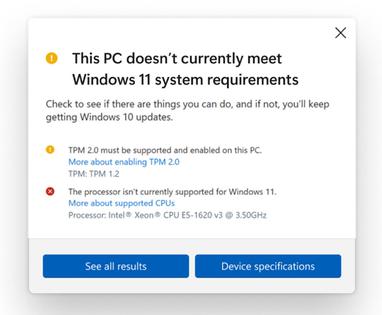
Finally, Microsoft said that it would be releasing an updated version of the PC Health Check app that it had pulled earlier. The new app (shown at the top of this article) includes “more complete and improved messaging on eligibility and links to relevant support articles that include potential remediation steps.” Of course, the PC Health Check app means little, if enthusiasts can still install a standalone Windows 11 ISO file on hardware that the PC Health Check app would seem to reject.
We know that those users who own older PCs should be able to run Windows 11 eventually. But did Microsoft really clear up any of the issues surrounding Windows 11 on Friday? We’d say no. It certainly could have, by spelling out the details in an official statement. But by releasing information privately to four publications—each of which reported the issue slightly differently—Microsoft simply confused the Windows 11 issue even further.
Sign up to gain exclusive access to email subscriptions, event invitations, competitions, giveaways, and much more.
Membership is free, and your security and privacy remain protected. View our privacy policy before signing up.
What’s new, plus best mac-related tips
and tricks
The latest business news, reviews, features and whitepapers
Watch our video news and reviews from around the world
Comprehensive buying guides, features, and step-by-step articles
Don’t have an account? Sign up here
Reproduction in whole or in part in any form or medium without express written permission of IDG Communications is prohibited. Copyright 2013 IDG Communications. ABN 14 001 592 650. All rights reserved.
Privacy Policy Reprints | Affiliate Link Policy
arnnet.com.au
cmo.com.au
Advertise with us Reprints Editorial Contacts


Don’t have an account? Sign up now
Forgot password?