How to run Android apps on any Windows 11 PC without Windows Insider – XDA Developers
Set up a new account on the XDA Developers Forums
Sign in to the XDA Developers Forums
Add swipe gestures to any Android, no root
Make your phone easier to use with one hand, no root
The best way to access XDA on your phone
A sweet, feature-filled launcher with a beautiful UX.
XDA’s official marketplace for buying and selling tech
Premium videos
It’s been just a day since Microsoft unveiled the long-anticipated Windows Subsystem for Android for Windows 11. The company has also published a plethora of documentation related to the integration with Amazon Appstore and Android app development on Windows using the native Android subsystem. However, unlike typical bleeding edge features, the Dev channel of Windows 11 isn’t officially permitted to access the initial preview for Android apps. For now, not only you’ll need to be enrolled in the Beta channel, but also your PC’s region should be set to the United States. Apart from these “soft” restrictions, you can only run a small set of Android apps published to the Amazon Appstore that are approved by Microsoft and Amazon at this moment.
If you’re on the Stable or Dev channel of Windows 11 and you don’t want to change the update channel just for the sake of running Android apps, then you would be glad to know that the current release of the Windows Subsystem for Android can be easily installed and run on the unsupported builds as well as on legacy platforms without any kind of modifications. It is also possible to sideload Android apps using ADB, which means you can enjoy all the bells and whistles without limiting yourself to the Amazon Appstore offerings.
Note: Before we get into the manual installation process of the Windows Subsystem for Android, keep in mind that the current release is nowhere near a stable milestone. Microsoft has put the restrictions by keeping the performance parameters in mind, which is why you may face occasional glitches (or even crashes) on the unsupported platforms. It is always a good idea to create a full disk image of your current Windows 11 installation before tinkering with it so that you can quickly revert back to a working state.
Just like the Windows Subsystem for Linux (WSL), the Windows Subsystem for Android is also distributed through the Microsoft Store for devices running Windows 11. Since Microsoft doesn’t offer an official way to fetch the direct download link of an app package from its Store, we will opt for a third-party site to pass the hurdle.
A MSIX Bundle is a packaging format that comprises multiple MSIX packages – each of which can support a specific system architecture. This is why you can install the package on both traditional x64 PCs, as well as on compatible ARM64 devices.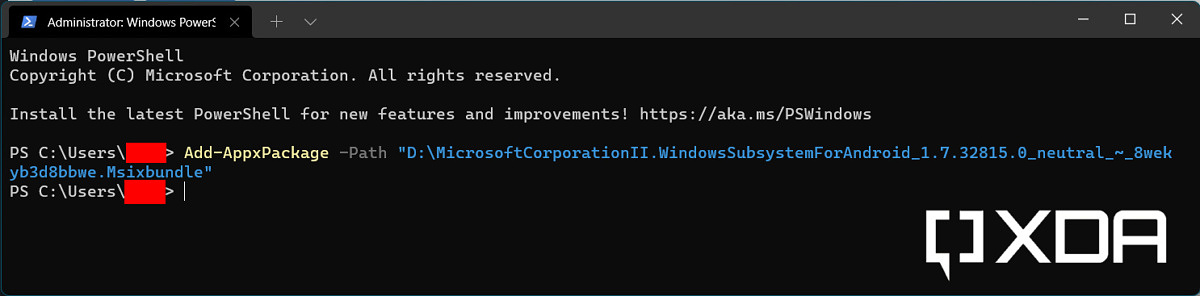
Now that we’ve installed the Windows Subsystem for Android, it’s time to configure it for app sideloading. To make things easier, we have a separate comprehensive tutorial for sideloading Android apps on Windows 11. Take a look at the guide below:
How to sideload Android apps on Windows 11
The end result should be something like this:
Termux, a popular Android terminal emulator app running under Windows 11
As you can see, the screenshots have been taken on a Windows 11 instance that is running build 22000.258, i.e. the first post-General Availability update. Matter of fact, the model of the CPU is the Intel Core i5-6500T, which is neither officially supported by the Windows Subsystem for Android, nor Windows 11. We haven’t encountered any groundbreaking glitches so far, but your mileage may vary.
Stay tuned to XDA as we cover all the updates and new features related to the Windows Subsystem for Android as they come out!
XDA » Tutorials »
DIY enthusiast (i.e. salvager of old PC parts). An avid user of Android since the Eclair days, Skanda also likes to follow the recent development trends in the world of single-board computing.
Receive the freshest Android & development news right in your inbox!
XDA Developers was founded by developers, for developers. It is now a valuable resource for people who want to make the most of their mobile devices, from customizing the look and feel to adding new functionality.
Are you a developer? | Terms of Service
This site is protected by reCAPTCHA and the Google Privacy Policy and Terms of Service apply.
Copyright © XDA